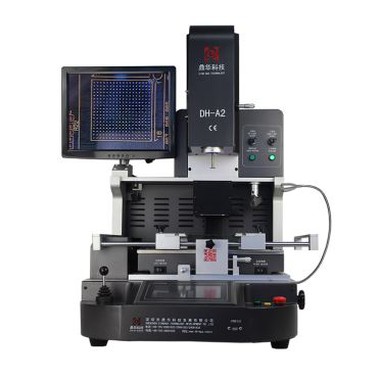
Laptop Bga Tshuab
Tshiab BGA rework tshuab nrog touchscreen rau temperatrue profiles teem thiab cia; Nrog txog li 4 pcs qhov ntsuas kub ntsuas cov chaw nres nkoj thiab huab cua ntws rau lub taub hau sab saud; Infrared preheating cheeb tsam tiv thaiv los ntawm cov ntaub thaiv npog hlau uas tuaj yeem ua rau cov txheej txheem rov ua haujlwm zoo dua.
Hauj lwm lawm
DH-5880 Laptop bga tshuab
Hloov kho dua tshiab los ntawm DH-5860, nrog rau kev saib tshiab thiab kev teeb tsa zoo dua, xws li, lub tshuab cua sov thiab ceramic cua sov cib, laser qhov chaw thiab ntau qhov chaw ntsuas kub.ic rovtshuab tag nrho

Khoom parameter
|
Fais fab mov |
AC100 ~ 220V ± 10%50/60Hz |
| Rate zog | 5500W cpu reballing tshuab |
| Lub tshuab cua sov | 1200Wbga tshuab rau motherboard |
| Lub tshuab cua sov qis |
1200W zm r6200 bga tshuab |
| Hauv qab IR | 3000W chip reballing tshuab |
| Profile khaws cia | mus txog 50000 pawg |
|
PCB Positioning |
V-groove, txav tau X / Y axis nrog universal fixtures uas muaj "Crocodile qhov ncauj" thiab cone-puab |
|
Chip positioning |
Laser taw tes ntawm nws qhov chaw |
|
Kev tswj qhov kub thiab txias |
PID, K-hom, kaw lub voj |
|
Touchscreen |
7 ntiv tes, qhov kub thiab txias ntawm lub sijhawm tiag tiag |
|
Qhov ntev |
L500 × W600 × H700 hli |
|
Net nyhav |
41kg uabga ic reballing tshuab |
Khoom piav qhiaic ib reballing tshuab nqe

Cov cua sov tuaj txawv teb chaws, uas tau ua cua sov tas li rau ob peb teev nrog cov cua sov ua kom muaj zog, kom paub tseeb tias Rework ua tiav. Thiab nrog kev tiv thaiv tsis siv neeg yog tias kub dhau.
Kub tswjsmd uatshuab ua haujlwm

PID algorithm yuav khaws qhov kub thiab txias los sib piv nrog cov ntsuas kub uas tau teeb tsa manually raws li 20ms, uas yuav ua kom sai yog tias muaj qhov sib txawv, kom paub tseeb tias txhua qhov kub nce siab kom cov chips tuaj yeem raug tshem tawm lossis soldered zoo.
Laser qhov chawib smd tshuab nqe

Laser liab-point ntsiab lus nyob rau hauv nruab nrab ntawm qhov chaw uas nti yuav hloov nyob rau hauv lub motherboard, nws yuav ua tau ib tug nti tso rau ntawm nws txoj cai postion sai sai.
Nqus cwj mem rau khaws thiab hloovsmd uatshuab dering

Lub tshuab muaj nws lub twj tso kua mis sab hauv, nws lub tshuab nqus tsev txuas nrog nws, rau nti khaws tom qab desoldering, los yog hloov pauv ntawm npauj-erboard rau soldering.
Touchscreensmd tshuab uas tsis muaj nqi

7 nti touchscreen suits rau inputing kub thiab lub sij hawm, txawm koj yog leej twg thiab nyob qhov twg koj nyob. Lub sijhawm tiag tiag qhia qhov kub thiab txias ntawm nws qhov nkhaus, thiab qhov ntsuas kub sab nraud tuaj yeem pom ntawm lub vijtsam kov.
Tias Ntau cov chips tuaj yeem rov ua dua tau teev tseg hauv qab no:

Xws li DIP, QFP, PLCC, QFN, PBGA, CPGA, TQFP, QFN tab sis tsis txwv rau lawv.smd uatshuab ceev 850a
Qhov tseem ceeb lees paub txog yuav kho lub computer li cas:
Yuav kho lub computer li cas? Yuav muaj txhua yam teeb meem me me thaum siv lub computer. Thaum twg muaj teeb meem, peb ib txwm nrhiav kev pab los ntawm ib puag ncig. Tom qab lub sijhawm ntev, peb yuav txaj muag. Yog tias koj xav kho lub computer, koj yuav teeb meem rau lwm tus, yog li koj yuav kho lub computer li cas? Niaj hnub no, Xiaobian yuav muab rau koj ib lub tswv yim dav dav ntawm yuav ua li cas los daws lub computer tsis ua haujlwm.
Yuav kho lub computer li cas? Lub tswv yim dav dav ntawm kev daws teeb meem computer tsis ua haujlwm:
Yuav kho lub computer li cas? Peb txhua tus paub tias qhov kev faib tawm ntawm lub khoos phis tawj tsis ua haujlwm tuaj yeem muab faib ua hardware tsis ua haujlwm thiab software tsis ua haujlwm raws li qhov muaj pes tsawg leeg ntawm lub computer.
Yuav ua li cas kho lub khoos phis tawj Ua ntej, kho vajtse tsis ua haujlwm yog hais txog qhov tsis ua haujlwm los ntawm kev puas tsuaj lossis kev ua haujlwm tsis zoo ntawm lub khoos phis tawj kho vajtse. Hardware faults kuj muaj xws li faults los ntawm cov Cheebtsam thiab chips, faults los ntawm kev thaiv thiab connectors, faults los ntawm cov khoom (tsim txheej txheem, electro-omagnetic yoj cuam tshuam, machinery, thiab lwm yam), faults los ntawm hardware compatibility, faults los ntawm jumpers thiab chaw , fais fab mov ua rau tsis ua hauj lwm, thiab lwm yam.
Yuav ua li cas kho lub khoos phis tawj Thib ob, software tsis ua haujlwm yog hais txog qhov tsis ua haujlwm ntawm lub khoos phis tawj kom tsis ua haujlwm ib txwm vim yog yam xws li kev teeb tsa lub khoos phis tawj tsis raug, kev cuam tshuam hauv computer lossis kev siv tsis raug ntawm software los ntawm cov neeg ua haujlwm. Rau cov neeg ua haujlwm hauv computer, computer downtime yog ib qho tshwm sim. Tsuas yog qee qhov teeb meem kho vajtse tsis zoo, feem ntau yog tshwm sim los ntawm software tsis ua haujlwm. Software tsis ua hauj lwm yog kwv yees li muab faib ua software compatibility tsis ua hauj lwm, system configuration tsis ua hauj lwm, kab mob tsis ua hauj lwm, thiab ua hauj lwm tsis ua hauj lwm.
Thaum lub computer tsis ua hauj lwm, yuav ua li cas kho lub computer? Ua ntej ntawm tag nrho cov, tsis txhob maj nrawm, txheeb xyuas thiab txheeb xyuas qhov ua rau ntawm qhov tsis ua haujlwm ib kauj ruam ntawm kev ua kom zoo, thiab tom qab ntawd tshem tawm nws. Cov txheej txheem tshwj xeeb yog raws li hauv qab no:
1. Txhawm rau ua qhov yuam kev, koj yuav tsum pib nrog qhov yooj yim tshaj plaws (sab nraud thiab tom qab ntawd sab hauv). Txhawm rau daws qhov yuam kev, koj yuav tsum pib nrog qhov yooj yim tshaj plaws, uas yog, ua ntej sab nraud thiab tom qab ntawd sab hauv. Tej yam yooj yim hais txog kev soj ntsuam ib puag ncig.
Saib xyuas ib puag ncig ib puag ncig lub computer, suav nrog qhov chaw, lub zog, kev sib txuas, lwm yam khoom siv, qhov kub thiab txias, thiab lwm yam.
Saib xyuas cov xwm txheej tshwm sim los ntawm lub khoos phis tawj, suav nrog cov ntsiab lus pom thiab qhov zoo sib xws thiab qhov sib txawv nrog cov xwm txheej ib txwm muaj.
Saib xyuas cov xwm txheej ib puag ncig hauv lub computer, suav nrog cov plua plav, xim ntawm cov khoom sib txuas, cov duab ntawm cov khoom, cov xwm txheej ntawm
qhov taw qhia teeb, thiab lwm yam.
Saib xyuas cov software thiab kho vajtse teeb tsa ntawm lub khoos phis tawj, suav nrog cov khoom siv kho vajtse zoo li cas, kev siv cov peev txheej, hom kev ua haujlwm zoo li cas
yog siv, zoo li cas ntawm daim ntawv thov software yog ntsia, thiab lub version ntawm qhov chaw tsav tsheb ntawm lub hardware. Pib los ntawm tej yam yooj yim yog conducive rau lub concentration
ntawm lub zog, thiab yog qhov tsim nyog rau kev txiav txim siab thiab qhov chaw ntawm qhov tsis raug. Peb yuav tsum xyuam xim rau qhov kev txiav txim thiab kev saib xyuas tsuas yog tom qab ua tib zoo soj ntsuam.
2. Yuav kho lub computer li cas? Xav ua ntej thiab tom qab ntawd ua raws li qhov tshwm sim, suav nrog cov hauv qab no:
Yuav kho lub computer li cas? Ua ntej xav txog yuav ua li cas, pib qhov twg, thiab tom qab ntawd ua tiag tiag. Nws tseem tuaj yeem hais tias qhov kev tsom xam thiab kev txiav txim siab yog thawj zaug, thiab tom qab ntawd
kev saib xyuas yog nqa tawm.
Rau qhov pom tshwm sim, ua ntej tshawb xyuas cov ntaub ntawv cuam tshuam ntau li ntau tau kom pom tias muaj cov kev cai sib xws, siv cov yam ntxwv, thiab lwm yam.,
thiab tom qab ntawd txheeb xyuas thiab txiav txim raws li cov ntaub ntawv tau txais, ua ke nrog koj tus kheej kev paub thiab kev paub dhau los, thiab tom qab ntawd pib kho.
Hauv cov txheej txheem ntawm kev tshuaj xyuas thiab kev txiav txim, peb yuav tsum txiav txim siab raws li peb cov kev paub thiab kev paub dhau los. Rau qhov tshwm sim uas peb tsis nkag siab lossis tsis ua
to taub tag nrho, peb yuav tsum sab laj cov neeg paub txog kev pab.
3. Thaum judging faults, nws yog thawj mos mos thiab ces nyuaj. Thaum txiav txim siab feem ntau ntawm lub khoos phis tawj, nws yuav tsum yog mos thiab tom qab ntawd nyuaj, uas yog, los ntawm tag nrho cov txheej txheem ntawm kev saib xyuas kev txiav txim, ib txwm txiav txim siab seb nws puas yog software txhaum ua ntej, tshawb xyuas software ua ntej, thiab tom qab ntawd txiav txim qhov software ib puag ncig. Thaum nws zoo li qub, yog tias qhov txhaum tsis tuaj yeem ploj mus, xyuas nws los ntawm sab kho vajtse.
4. Muab qhov tseem ceeb ntawm qhov tsis sib xws thaum tu. Hauv kev saib xyuas, nws yog ib qho tsim nyog yuav tsum paub qhov txawv ntawm qhov tseem ceeb thiab theem nrab, uas yog, kom nkag siab qhov tsis sib haum xeeb.
Thaum muaj qhov tshwm sim txhaum cai, qee zaum lub tshuab faulty muaj ntau tshaj ib qho tshwm sim, tab sis ob lossis ntau qhov txhaum. Lub sijhawm no, qhov tshwm sim tseem ceeb yuav tsum raug txiav txim thiab kho ua ntej. Rau cov tsos mob txhaum cai (tej zaum cov tsos mob ua txhaum thib ob tsis xav tau kev saib xyuas lawm).
Cia peb tham txog kev siv qhov tseeb ntawm cov tswv yim no los ntawm kev ua txhaum classic:
"Cov neeg siv khoom teb, oh kuv, kuv lub khoos phis tawj tau qeeb thiab qeeb qeeb. Qee zaum nws tseem khov thiab khov. Kuv qhov kev teeb tsa yog kuv 3 4G cov zaub ywj pheej, thiab lub kaw lus tsuas yog ua tiav nrog WIN7. Dab tsi tshwm sim? hard drive tawg!" Kuv ntseeg tias ntau tus neeg tau hnov cov lus tsis txaus siab ntawm cov neeg siv khoom! Peb yuav tsum ua li cas thaum peb ntsib qhov no?
Kev soj ntsuam yuam kev: Los ntawm qhov kev xav ntawm lub computer hardware configuration, nws yuav tsum tsis txhob muaj teeb meem ntawm lub computer hardware configuration tsawg. Tom qab kev tshuaj xyuas, nws tau pom tias cov ntsiab lus tseem ceeb cuam tshuam rau kev pib ceev ntawm lub khoos phis tawj yog tias muaj ntau yam software thiab daim ntawv thov software raug thauj khoom thaum lub sijhawm pib, thiab qhov system khib nyiab thiab sy-stem nqis yog tsim thaum lub sijhawm ua haujlwm. Cov no yog cov laj thawj rau lub kaw lus qeeb thiab pib qeeb qeeb. Yog li ntawd, cov neeg siv tuaj yeem tshem tawm cov khoom tsis tsim nyog thiab cov software hauv cov khoom pib ua kom nrawm nrawm ntawm lub khoos phis tawj.